

It’s 7:50 a.m. on a Monday in Idaho Falls when the front-desk coordinator at a four-provider dental office finds that the imaging workstation won’t start. The last backup notice said “successful.” The office manager can’t say whether the past three weeks of X-rays are on that machine, on a server, or only in an email attachment. Patients start arriving at 8:00. The scenario is hypothetical, but the questions it raises are exactly what a HIPAA technology checklist is built to answer before an interruption happens.
A HIPAA technology checklist can help your practice find gaps before a lost laptop, compromised account, or failed backup interrupts patient care. Start by checking where patient information lives, who can access it, and whether you can recover it when something goes wrong.
Medical and dental practices covered by HIPAA must protect electronic protected health information (ePHI) through administrative, physical, and technical safeguards. Software labeled “HIPAA compliant” does not make a practice compliant; workflows, settings, staff procedures, and documentation also matter. (HHS summary of the Security Rule)
Use this HIPAA technology checklist with your office manager and IT provider. Record unresolved items, assign someone to address them, and keep evidence of the work completed. The steps apply to both medical practice IT security and dental cybersecurity, with notes where the two differ.
What’s in This Guide
- What the Current HIPAA Security Rule Requires
- Your HIPAA Technology Checklist: 12 Critical Steps
- Dental Cybersecurity: What Is Different for Imaging Systems
- Real-World Scenario: Two Practices, Two Outcomes
- The HIPAA Technology Checklist at a Glance
- What to Ask Your Healthcare IT Provider About HIPAA IT Compliance
- Frequently Asked Questions
What the Current HIPAA Security Rule Requires
HIPAA generally covers healthcare providers that transmit health information electronically in connection with standard transactions adopted by HHS, such as certain claims transactions. In practice, that includes most medical and dental offices that bill insurers electronically. The Security Rule also applies to business associates. Being a medical or dental provider alone does not automatically establish coverage, so confirm how the rules apply to your practice. (HHS)
The current rule distinguishes between required and addressable implementation specifications. Addressable does not mean optional. You must assess whether the safeguard is reasonable and appropriate, implement it when it is, or document why it is not and implement an equivalent alternative when reasonable and appropriate. (45 CFR 164.306)
HHS continues to identify its expanded cybersecurity rule as proposed. The current Security Rule remains in effect. The more explicit proposed provisions for multi-factor authentication (MFA), encryption, segmentation, and testing do not create current blanket mandates. (HHS proposed rule page) Working through the steps below now also prepares your practice if the proposal is finalized.
Last reviewed: October 30, 2026.
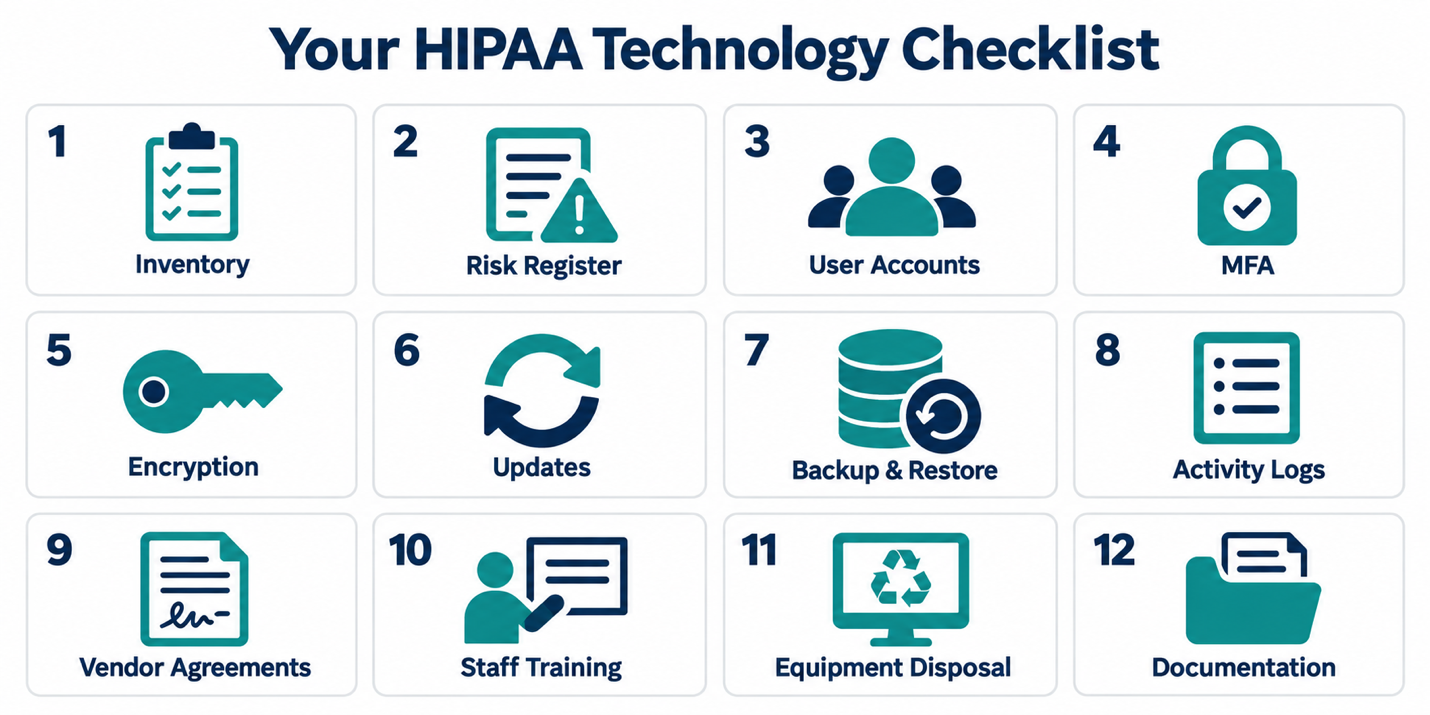
Your HIPAA Technology Checklist: 12 Critical Steps
The legal obligations below are summarized. The practical checks are suggested ways to assess implementation, and their suitability depends on your practice and risk analysis.
1. Identify Every Location That Holds Patient Information
HHS risk-analysis guidance calls for identifying all ePHI your organization creates, receives, maintains, or transmits. That scope extends beyond the electronic health record.
☐ List clinical software, dental imaging systems, email, electronic forms, shared storage, mobile devices, and backups that handle ePHI.
☐ Trace how information moves to billing companies, specialists, laboratories, and other service providers.
☐ Identify personal devices and remote connections used for work.
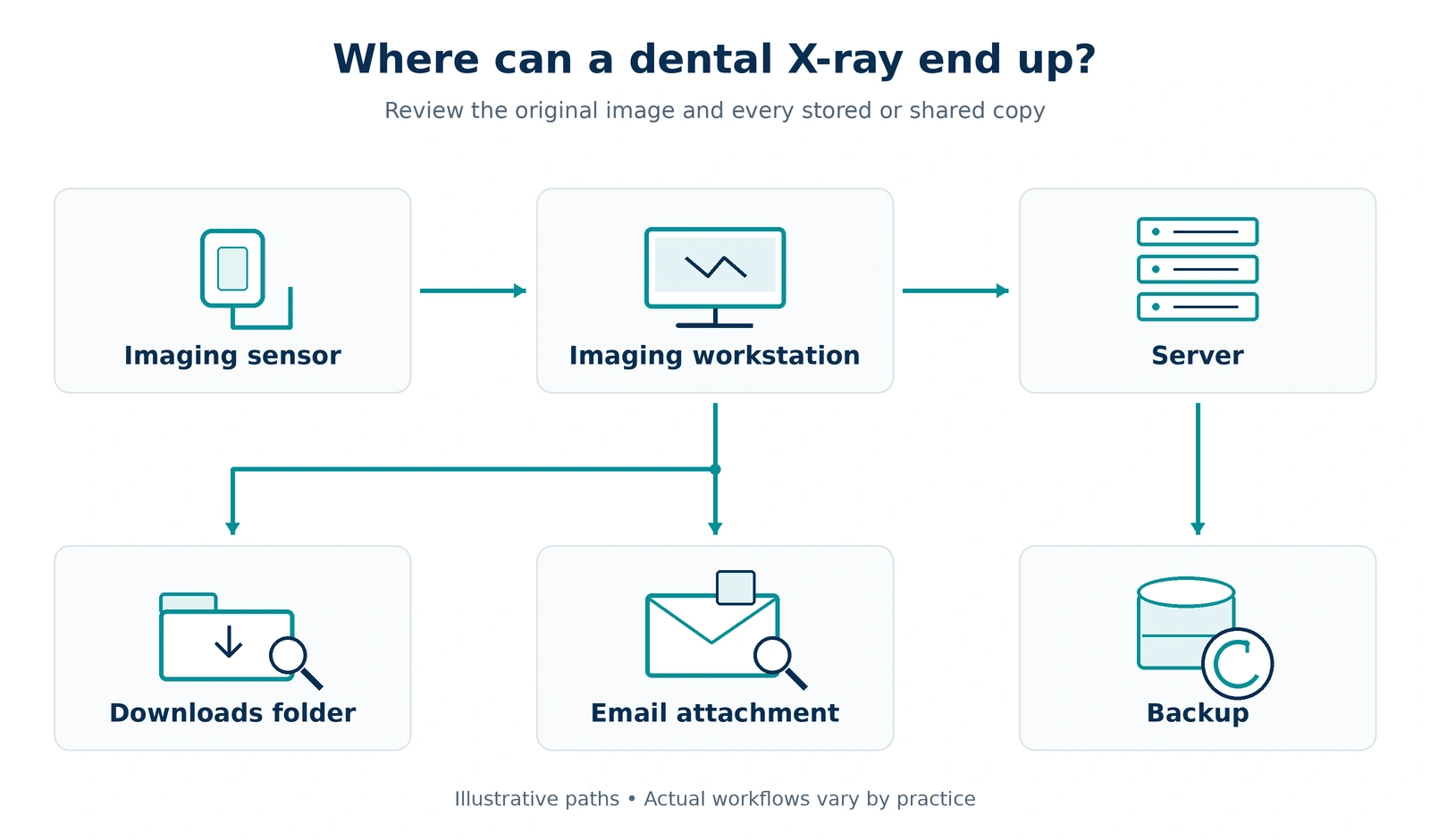
For dental cybersecurity, trace an image after it leaves the imaging workstation. Check for copies in downloads folders and email attachments, then add those locations to the inventory and to the diagram showing where information moves.
2. Document Risks and Assign Corrective Actions
A HIPAA security risk analysis must assess potential risks and vulnerabilities to ePHI. Consider threats, existing safeguards, likelihood, and potential impact. A vulnerability scan supplies technical findings but cannot, by itself, cover the full assessment. (HHS)
☐ Build a corrective-action register with the finding, affected system, responsible person, priority, target date, and completion evidence.
☐ Keep the risk analysis and follow-up records together so unresolved work remains visible.
For example, an unsupported imaging workstation needs a documented response that accounts for vendor compatibility and clinical use. For a broader view of how risk assessments work, see MOATiT’s IT risk assessment guide.
3. Review Individual Accounts and Access Permissions
The Security Rule requires unique user identification and procedures for verifying the identity of those seeking access to ePHI. It also requires emergency access procedures. (45 CFR 164.312)
☐ Check whether staff activity can be attributed to individual users.
☐ Review access for employees who have changed roles or left, and examine vendor support accounts.
☐ Separate administrative privileges from routine work where feasible.
☐ Document how authorized staff can obtain necessary information during an emergency.
4. Strengthen Authentication With MFA
HHS recommends multi-factor authentication for internet-accessible assets and accounts where safe and technically feasible. Its Cybersecurity Performance Goals are voluntary guidance, not standalone HIPAA regulations.
☐ Prioritize email, remote access, cloud services handling ePHI, and administrator accounts.
☐ Ask your IT provider for a coverage report identifying accounts with MFA enabled and systems that cannot support it.
☐ Document how remaining exposure will be addressed.
For a shared reception workstation, review both workstation access and access to each clinical application. One setting may not protect every account used on that computer. Email is a common entry point, so AI-enhanced email protection is worth reviewing alongside MFA.
5. Evaluate Encryption and Information Sharing
The current rule treats encryption specifications as addressable. It also requires transmission security and safeguards against improper alteration or destruction of ePHI. (45 CFR 164.312)
☐ Review encryption on portable devices, storage, and backups.
☐ Check how staff send records, imaging exports, and attachments, including any unapproved sharing tools.
☐ Record encryption decisions and how recovery keys are protected and retrieved.
A practical exercise is to ask a staff member to describe how they send a patient record to another provider. Compare that workflow with your written procedure.
6. Address Software Vulnerabilities and Network Exposure
HHS recommends mitigating known vulnerabilities and separating mission-critical assets into network segments to limit an attacker’s movement after an initial compromise. (HHS performance goals)
☐ Review overdue updates, unsupported software, firewall settings, and remote-support connections.
☐ Separate guest Wi-Fi from clinical systems, and evaluate isolation for imaging equipment and connected devices.
☐ Ask for a list of unresolved exposures and their mitigation plans.
Coordinate changes with the equipment vendor so security work accounts for clinical operation. A report showing completed updates can leave important exceptions unexplained.
7. Test Whether Backups Can Restore Usable Information
HIPAA requires data backup, disaster recovery, and emergency operations planning. HHS ransomware guidance recommends restoration tests and consideration of backups unavailable from the normal network.
☐ Verify that backup coverage includes imaging data and other records stored outside the main clinical application.
☐ Review failed backup jobs and protect recovery credentials.
☐ For cloud software, confirm what the vendor can restore, how quickly, and what your practice must do.
☐ Document a restoration test that checks whether recovered information is usable.
☐ Include a downtime procedure for staff while systems are unavailable.
MOATiT’s backup and disaster recovery services are relevant when reviewing these recovery needs, and our business backup testing guide explains why a successful backup notice does not prove you can restore.
8. Confirm That System Activity Is Recorded and Reviewed
The Security Rule requires audit controls and regular review of relevant information-system activity. (45 CFR 164.312, 164.308)
☐ Identify which clinical applications, cloud services, and devices produce useful records.
☐ Confirm logging is enabled, assign a reviewer, and define events that need escalation.
☐ Keep review records and document investigations.
For example, ask who would investigate an unusual sign-in or an unexpected export of patient records. Check whether the available logs would help that person understand what happened.
9. Check Vendor Agreements and Cloud Responsibilities
Cloud services can handle ePHI when applicable HIPAA obligations are met. A cloud provider maintaining ePHI on your behalf is generally a business associate even if it cannot decrypt the information. An appropriate business associate agreement, or BAA, is required. (HHS cloud computing guidance)
☐ Review vendors that handle patient information, including hosting, backup, communications, and IT support services.
☐ Confirm which are business associates and that agreements cover the services actually used.
☐ Clarify responsibility for configuration, access, recovery, and incident reporting.
A BAA does not tell your staff which settings to use or establish that the service has been configured appropriately. If your practice hosts its EMR or EHR with an outside provider, review that arrangement closely, and see MOATiT’s EMR/EHR hosting for how hosted environments are handled.
10. Train Staff and Prepare for Security Incidents
HIPAA requires workforce security-awareness training and procedures for responding to suspected or known security incidents, mitigating harm where practicable, and documenting outcomes. (45 CFR 164.308)
☐ Give staff a clear reporting contact for suspicious messages, lost devices, unexpected MFA prompts, and accidental disclosures.
☐ Include management and temporary workforce members in relevant training.
☐ Keep current response contacts and rehearse a scenario, such as a compromised receptionist’s email account.
☐ Agree on who coordinates with IT, preserves evidence, and assesses notification duties.
Not sure how often to train? Our guide to cybersecurity awareness training frequency lays out a practical schedule.
A security incident needs assessment; it is not automatically a reportable breach. For breaches requiring individual notice, the federal rule generally requires notification without unreasonable delay and no later than 60 days after discovery. HHS and, in some circumstances, media notification also apply. Sixty days is not a waiting period. (HHS Breach Notification Rule)
11. Secure Workstations and Retired Equipment
HIPAA physical safeguards address facility access, workstation security, and devices and media containing ePHI. Disposal and removal of ePHI before media reuse are required specifications. (45 CFR 164.310)
☐ Review reception screens, equipment rooms, portable devices, and equipment awaiting repair or disposal.
☐ Establish how devices are returned when staff leave and how information is removed before equipment is reused.
☐ Include retired imaging computers and external drives in your review.
☐ Store disposal and sanitization records with the relevant equipment records.
12. Keep Policies and Evidence Current
Assign a security official and periodically evaluate your safeguards. (45 CFR 164.308) Retain required Security Rule documentation for six years from creation or the date it was last in effect, whichever is later. Update it when operational or environmental changes affect ePHI security. (45 CFR 164.316)
That six-year provision is not a universal retention period for every patient record, backup, or technical log.
☐ Maintain an access-controlled location for policies, risk decisions, agreements, and evidence.
☐ Make procedures available to the people responsible for implementing them.
☐ When you replace software or add a location, check that the documentation still describes how the practice works.
Dental Cybersecurity: What Is Different for Imaging Systems
Dental offices run on a mix of practice-management software, digital imaging sensors, chairside workstations, and cloud tools. That mix creates a few extra places for patient information to hide.
- Image copies multiply. One X-ray can exist on the imaging workstation, a server, a downloads folder, an email attachment, and a backup. Step 1 should follow every copy.
- Older workstations linger. Imaging software sometimes depends on an older operating system. Document the risk, the vendor’s position, and the compensating controls (Step 2 and Step 6).
- Retired equipment still holds data. Imaging computers and external drives need documented sanitization before reuse or disposal (Step 11).
Medical practices have their own version of the same challenge, with EHR integrations, connected devices, and lab or specialist exchanges. Either way, the goal of medical practice IT security is the same: know where information lives, control who can reach it, and prove you can recover it.
Real-World Scenario: Two Practices, Two Outcomes
Picture two small practices, one medical and one dental, that lose access to their main clinical server on the same Monday morning because of a hardware failure. These practices are fictional, but the pattern is a familiar one.
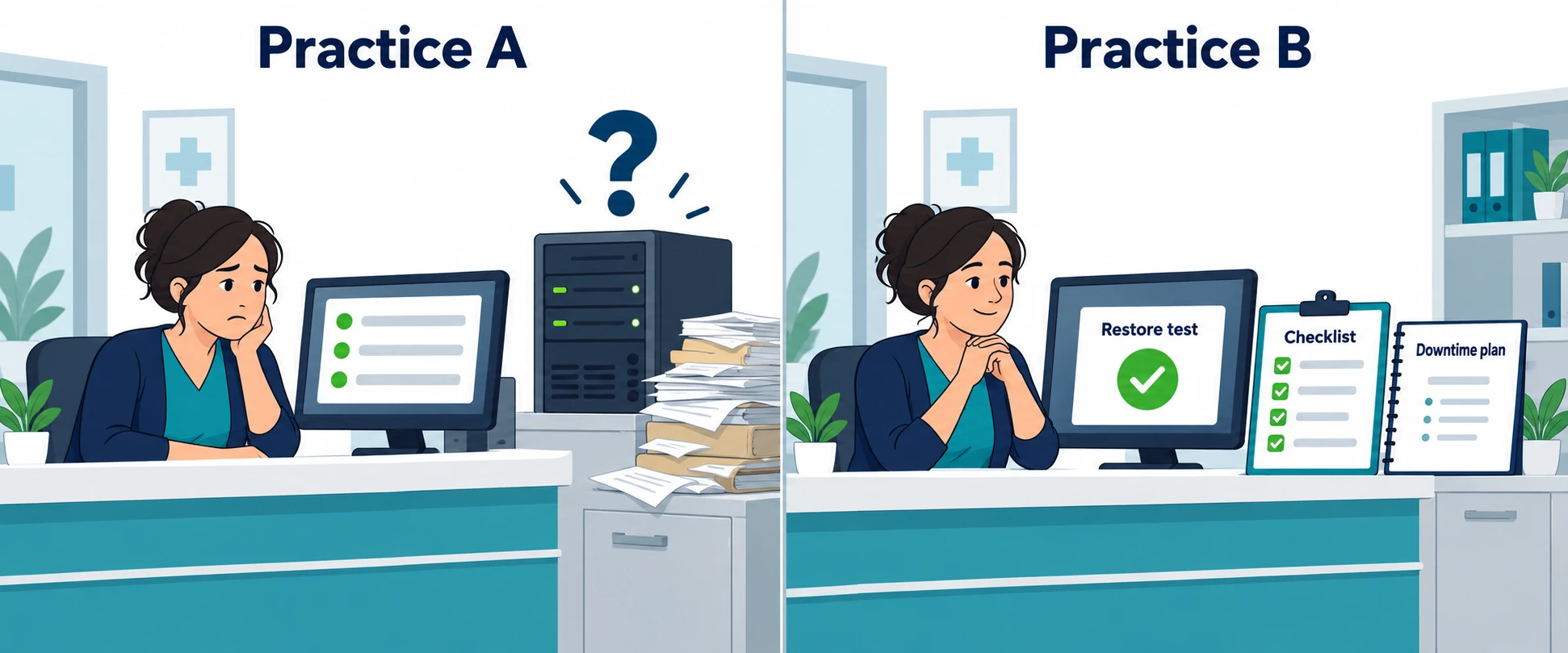
Practice A has never tested a restore. The backup dashboard shows green, but nobody has confirmed that imaging files are included. The office manager can’t find the vendor’s support contact, and no one knows whether the hosting vendor signed a BAA. Staff improvise on paper for two days while the answers come together.
Practice B worked through a HIPAA technology checklist last quarter. It keeps an inventory of where patient information lives, a tested restore result, a downtime procedure at the front desk, and a one-page list of vendors with agreements on file. Staff switch to the downtime procedure at 8:05, the IT provider restores from a tested backup, and the corrective-action register captures what to improve.
The difference was not luck. It was preparation that was documented before it was needed.
The HIPAA Technology Checklist at a Glance
Use this summary to see where your practice stands. Anything you cannot check off becomes an item for your corrective-action register.
☐ Inventory of every location and system that holds ePHI, including imaging and backups
☐ Documented risk analysis with a corrective-action register and named owners
☐ Unique user accounts, reviewed access, and an emergency-access procedure
☐ MFA enabled on email, remote access, cloud ePHI services, and administrator accounts
☐ Encryption decisions recorded for devices, storage, backups, and transmissions
☐ Updates, unsupported software, and network exposure reviewed and tracked
☐ Backups that include imaging data and a documented, successful restore test
☐ Logging enabled, a named reviewer, and defined escalation events
☐ BAAs in place for vendors that handle ePHI, with responsibilities clarified
☐ Staff trained, a reporting contact assigned, and an incident-response scenario rehearsed
☐ Workstations, retired equipment, and media handled with documented sanitization
☐ Policies and evidence stored in one place and kept current
What to Ask Your Healthcare IT Provider About HIPAA IT Compliance
When comparing support for HIPAA IT compliance, request specific deliverables:
- What systems and workflows will your assessment cover?
- What will our office manager receive, and who tracks corrective actions?
- Can you show our latest restoration-test results and unresolved security findings?
- Which monitoring and response tasks belong to your team and which belong to ours?
- Will you sign a BAA when your work makes you a business associate?
These questions help a practice compare the scope of support and identify responsibilities that still need an owner.
Frequently Asked Questions About the HIPAA Technology Checklist
Does HIPAA Require an Annual Risk Analysis?
The current rule does not set one universal annual deadline. HHS describes risk analysis as ongoing, with updates needed as circumstances change. An annual review may help organize work, but new systems or an incident can require attention sooner. (HHS)
Is Antivirus Enough for Medical Practice IT Security?
No. Malware protection addresses one part of a security program. HIPAA also requires applicable administrative, physical, and technical safeguards. (HHS, ransomware guidance)
Does Completing This HIPAA Technology Checklist Prove Compliance?
No. This HIPAA technology checklist helps organize a review. It does not cover every HIPAA obligation or establish that safeguards work in your environment. Compliance requires meeting all applicable requirements. (HHS)
Is the Proposed HIPAA Security Rule Update in Effect?
No. As of our last review, HHS continues to identify the expanded rule as proposed, and the current Security Rule remains in effect. Check HHS’s proposed rule page for the latest status.
Who Should Complete the Checklist?
Your office manager or designated security official should lead it, with input from clinical staff and your IT provider. Assign each unresolved item an owner and a target date.
Review Your Practice Technology With MOATiT
MOATiT provides IT support for medical and dental practices in Idaho, including support for clinical systems, networks, and backups, with cybersecurity solutions for practices in Idaho Falls, Pocatello, and across the region.
Can your office manager say who has access, what is backed up, and how recovery would work? If not, start with a free IT risk assessment. It is a practical review of your accounts, email protection, backups, and access that helps you find technology gaps before you assign corrective actions. It is not a substitute for a HIPAA security risk analysis. Book your free IT risk assessment or call 208-900-6628 to discuss your current setup and next steps.
This article provides general education, not legal advice or a guarantee of HIPAA compliance.
Sources and Further Reading
- HHS: Summary of the HIPAA Security Rule
- 45 CFR 164.306: Security standards and general rules
- HHS: HIPAA Security Rule NPRM
- HHS: Guidance on Risk Analysis
- 45 CFR 164.312: Technical safeguards
- HHS: Healthcare and Public Health Cybersecurity Performance Goals
- HHS: Fact Sheet on Ransomware and HIPAA
- 45 CFR 164.308: Administrative safeguards
- HHS: Guidance on HIPAA and Cloud Computing
- HHS: Breach Notification Rule
- 45 CFR 164.310: Physical safeguards
- 45 CFR 164.316: Policies and procedures and documentation


