

It’s 4:45 p.m. on a Friday in Idaho Falls when the bookkeeper at a 20-person office opens an email that looks like it came from a longtime vendor. The vendor has “switched banks,” the message says, and the next payment needs to go to the new account before the weekend. The logo is right. The tone is right. Even the sender’s name is right. Whether she handles that moment well depends less on a policy buried in a handbook than on cybersecurity awareness training frequency: how recently, and how often, her team has practiced exactly this decision.
Employees should receive cybersecurity awareness training during onboarding and throughout the year. For a small or midsize business, a practical starting schedule is an annual core refresher, focused quarterly sessions, and brief monthly reminders. Add targeted guidance whenever threats, job responsibilities, or business systems change.
The right cybersecurity awareness training frequency depends on what your employees do and the information they handle. A bookkeeper approving payments faces different situations from a receptionist scheduling appointments or an administrator managing Microsoft 365.
For business owners and managers in Pocatello, Idaho Falls, and across Idaho, the goal is to make safe decisions part of everyday work. Employees should know how to verify a request, protect company information, and report a concern quickly. This guide covers what official guidance says, a five-step schedule you can start using this quarter, what to teach, and how to tell whether it is working.
What’s in This Guide
- What Official Guidance Says About Cybersecurity Awareness Training Frequency
- The 5 Steps in a Practical Cybersecurity Awareness Training Schedule
- Why One Annual Session Is Not Enough
- How Often Should You Provide Phishing Training for Employees?
- What Employee Security Training Should Cover
- Real-World Scenario: Two Idaho Offices, Two Outcomes
- Adjusting Cybersecurity Awareness Training Frequency by Role and Risk
- How to Tell Whether Cybersecurity Awareness Training Is Working
- An Employee Security Training Checklist
- Why Technical Protection Matters Alongside Training
- Frequently Asked Questions
What Official Guidance Says About Cybersecurity Awareness Training Frequency
The Federal Trade Commission recommends training employees on a regular schedule and updating them about new risks and vulnerabilities. Its small-business guidance also includes security practices in new-staff orientation.
NIST’s guidance on cybersecurity and privacy learning programs emphasizes ongoing learning, training tailored to job responsibilities, and evaluating whether the program changes behavior. It describes general user training as often annual but preferably more frequent.
The schedule below is our practical starting recommendation based on those principles. It is not a universal regulatory requirement or a fixed interval prescribed by NIST, so adapt it to your risk, staffing, and any obligations that apply to your business.
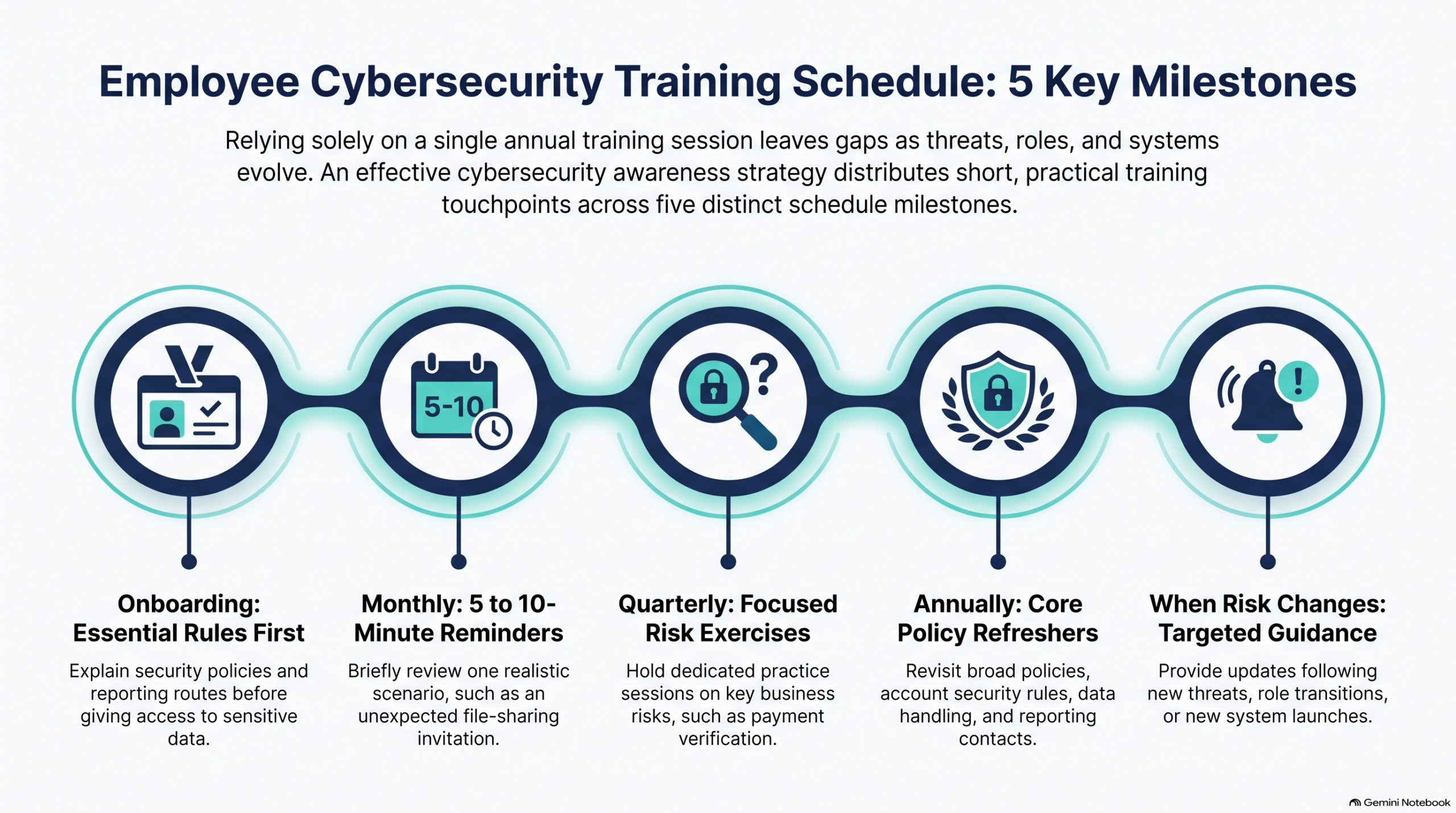
The 5 Steps in a Practical Cybersecurity Awareness Training Schedule
Think of cybersecurity awareness training frequency as layers rather than a single event. Each layer reinforces the one before it, and the lighter layers keep the heavier ones from fading. Here is the schedule at a glance:
| When | Recommended approach | Example |
|---|---|---|
| During onboarding | Explain essential security rules before independent access to sensitive systems or data. | Show a new employee how to use approved tools and report a suspicious message. |
| Monthly | Discuss one realistic scenario. Five to ten minutes is a manageable starting point. | Review an unexpected sign-in prompt or shared-file invitation. |
| Quarterly | Hold a focused session or practical exercise on a relevant business risk. | Practice verifying a vendor’s request to change bank details. |
| Annually | Refresh core policies, account security, data handling, and incident reporting. | Confirm reporting contacts and review responsibilities. |
| When risk changes | Provide timely guidance after a near miss, new threat, role change, or system change. | Walk through the rules for a new payroll platform. |
1. Start With Onboarding
Explain essential security rules before a new employee gets independent access to sensitive systems or data. Show them the approved tools, how to verify an unusual request, and how to report a suspicious message, on day one rather than after the first mistake.
2. Add a Monthly Scenario
Discuss one realistic scenario each month. Five to ten minutes at a team meeting is a manageable starting point. Review an unexpected sign-in prompt or a shared-file invitation and ask what the team would do. Short and frequent keeps good habits fresh.
3. Hold a Quarterly Practice Session
Each quarter, run a focused session or practical exercise on a risk that is relevant to your business. For example, have the team practice verifying a vendor’s request to change bank details, using a trusted contact method rather than the details in the message.
4. Refresh Core Policies Annually
Use an annual session to refresh the fundamentals: account security, data handling, and incident reporting. Confirm who employees should contact, and review everyone’s responsibilities.
5. Train Again When Risk Changes
Provide timely guidance after a near miss, a new threat, a role change, or a system change, such as walking staff through the rules for a new payroll platform. Keep the effort proportionate: a short discussion can reinforce one skill, while a new payroll system or a significant security incident may require a more detailed walkthrough.
Why One Annual Session Is Not Enough
An annual refresher helps establish shared expectations, but employees need instructions that match the situations they face between sessions. A policy reviewed in January may not explain how to handle a new file-sharing tool introduced in June. That is the core weakness of an annual-only cybersecurity awareness training frequency.
Consider a hypothetical Idaho Falls office that changes its process for approving vendor payments. Employees should practice the new verification steps when that process launches. Waiting for the next annual session leaves them using an outdated workflow.
Use short follow-up discussions to check understanding. Ask employees what they would do in situations such as these:
- How would you verify a request to change a vendor’s bank account?
- What should you do if a multi-factor authentication (MFA) prompt appears when you are not signing in?
- Who should you contact after entering information into a suspicious website?
Their answers show whether your instructions are clear and usable.
For a broader view of the protections that support these decisions, use MOATiT’s small-business cybersecurity checklist.
How Often Should You Provide Phishing Training for Employees?
Include phishing during onboarding, revisit it in short monthly reminders, and use quarterly scenarios as a starting point for practice. Increase attention when your team encounters repeated suspicious requests or has trouble following the reporting process.
Phishing training for employees should address convincing requests as well as obvious scams. Include unexpected sign-in links, text messages, fake support calls, QR codes leading to unfamiliar login pages, and shared-file invitations. Teach staff to assess what a message asks them to do, including requests to bypass an approval or provide a sign-in code.
Practice the Decision and the Verification Steps
A useful exercise is a hypothetical vendor email announcing new bank details. Ask the team to demonstrate how it would verify that change using a trusted number already on file. Calling the number supplied in the suspicious email does not provide independent verification.
The FTC’s phishing guidance recommends verifying questionable requests through a known contact number and giving employees a way to report suspicious messages. It also suggests considering phishing simulations.
If your business uses a qualified training provider or an approved internal program for phishing simulations, consider starting with a quarterly exercise and adjust to the results. Give constructive feedback and explain the correct action. Avoid collecting real passwords and keep individual results private. Simulations are optional tools, and a guided discussion using a fictional example can also help a small team practice its decisions.
Technical filters help too. AI-enhanced email protection can help block many malicious messages before they reach an inbox, which means fewer risky decisions land on your employees.
What Employee Security Training Should Cover
Account Access and Unexpected Sign-In Requests
Explain unique passwords, the approved password manager, and multi-factor authentication. Employees should know how to report an MFA prompt they did not initiate, and that they should never share passwords or sign-in codes with an unexpected caller. Include your organization’s actual account-recovery process so employees know where to seek help when they cannot sign in safely.
Payments and Requests From Familiar People
Practice how to verify bank-detail changes, payroll updates, and urgent purchase requests. Owners and managers should follow the same approval rules they expect employees to use.
Sensitive Information and Approved Tools
Show employees where business records belong, how to check file-sharing permissions, and which applications they may use. Identify approved AI tools and explain which information employees may or may not enter. Use examples relevant to the employee’s work, such as sending a customer document to an outside accountant or handling payroll records.
Reporting Concerns and Mistakes
Give employees one clear reporting route and a backup contact method if company email is unavailable. Ask them to report:
- What they received or noticed.
- Approximately when it happened.
- Whether they clicked a link, downloaded a file, entered information, or approved a prompt.
Make the expectation explicit: report immediately, even if you are unsure whether anything harmful happened. A prompt report gives IT the opportunity to assess the event and decide what action is needed.
Real-World Scenario: Two Idaho Offices, Two Outcomes
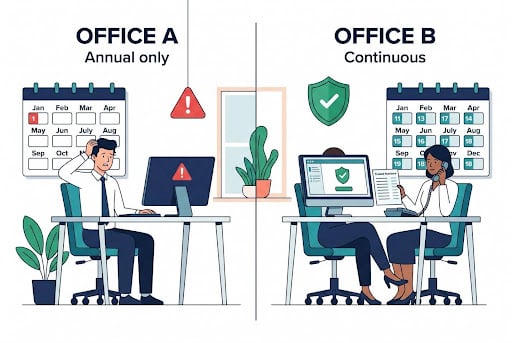
Picture two 20-person offices, one in Idaho Falls and one in Pocatello. Both receive the same convincing email from a “vendor” asking to change bank details. These offices are fictional, but the pattern is a familiar one.
Office A holds one security session every January. The vendor email arrives in August. The bookkeeper can’t remember the approved process, so she replies to the number in the email, and the “vendor” happily confirms the new account. The payment goes out, and nobody realizes anything is wrong until the real vendor asks about a missing payment.
Office B runs a five-minute scenario at its monthly meeting and practiced this exact bank-detail check last quarter. The bookkeeper calls the number already on file, learns the request is fake, and reports the email within minutes. Her IT provider checks whether anyone else received it and blocks the sender.
The difference was not luck. It was how often each office had practiced the decision before it mattered.
Adjusting Cybersecurity Awareness Training Frequency by Role and Risk
Not every employee needs the same cybersecurity awareness training frequency. Schedule targeted instruction when someone gains new access or responsibilities. Finance teams may need more practice with payment verification. HR staff need guidance on protecting employee records. Administrators need training on the systems and permissions they manage. Managers should practice escalation and incident communications.
Also revisit training after introducing new software, changing remote-work arrangements, or finding a recurring mistake. If employees repeatedly share files too broadly, review both the instructions and the software’s default settings.
An IT risk assessment can help identify where business processes, access, and technical weaknesses deserve attention. Use those priorities to choose training topics.
How to Tell Whether Cybersecurity Awareness Training Is Working
Track completion, but also check whether employees can perform the actions the training teaches. Review a small set of indicators each quarter, and adjust your cybersecurity awareness training frequency if the same issues keep appearing:
| Indicator | What to check |
|---|---|
| Participation | Have employees, owners, and managers completed the instruction relevant to their roles? |
| Reporting readiness | Can staff locate reporting instructions and identify a backup contact? |
| Verification skills | Can employees demonstrate how to verify a payment change or unexpected request? |
| Reporting timeliness | How much time passes between noticing a concern and reporting it? |
| Recurring issues | Are the same mistakes repeating, and what follow-up action was taken? |
If you use phishing simulations, compare exercises with similar difficulty and review reporting as well as clicks. A more convincing scenario may produce different results without proving that employees have become less careful.
More reports can mean employees are more willing to ask for help. Examine what changed before treating an increase as a failure. Keep records of the topic, date, participants, and follow-up action so the next session addresses a specific need.
An Employee Security Training Checklist
Use this checklist to confirm your cybersecurity awareness training frequency covers the basics:
☐ One person is assigned to own the training schedule
☐ Security rules are part of new-hire onboarding
☐ A five-to-ten-minute scenario is on the calendar every month
☐ A practical exercise is scheduled each quarter
☐ The annual refresher of core policies is on the calendar
☐ Employees know one reporting route and a backup contact
☐ Approved tools, including AI tools, and off-limits information are clearly identified
☐ Payment and bank-detail changes are verified through a trusted contact on file
☐ Topic, date, participants, and follow-up actions are recorded
☐ Training topics are reviewed alongside your technical protections
Why Technical Protection Matters Alongside Training
Employee awareness is one part of a wider security program. The FTC’s small-business guidance also recommends measures such as multi-factor authentication, software updates, backups, and an incident-response plan. Businesses should review their email protections, account permissions, device security, and response responsibilities alongside employee habits.
Training builds good habits. A well-managed security environment makes sure one mistake doesn’t become a business-stopping incident. That is where a cybersecurity partner earns its place: MOATiT takes care of the technical side, including email protection, multi-factor authentication, patching, monitoring, and backups, so your employees are not the only line of defense. Our overview of cybersecurity essentials for small businesses explains the foundational protections.
Recovery deserves its own practice. MOATiT’s business backup testing guide explains why a successful backup notification does not establish that your business can restore usable data.
Employees cannot be expected to prevent every incident. Combine their informed decisions with workable procedures, technical protection, and a prepared response.
Frequently Asked Questions About Cybersecurity Awareness Training
What Is the Best Cybersecurity Awareness Training Frequency for Small Businesses?
There is no single required interval. A practical starting point is onboarding training, a five-to-ten-minute monthly scenario, a quarterly practice session, an annual refresher, and targeted guidance when risks or systems change. Adjust your cybersecurity awareness training frequency based on your team’s roles, the information they handle, and what your quarterly review shows.
Is Annual Cybersecurity Awareness Training Enough?
An annual session alone may leave gaps as roles, systems, and threats change. Use it as a core refresher and add recurring reminders, practical sessions, and timely updates based on your team’s needs.
Should Small Businesses Train Every Employee?
Include everyone who uses business systems or handles company information, including owners, managers, and temporary staff with access. Tailor the depth and topics to their responsibilities.
Are Phishing Simulations Required?
The FTC presents simulations as an option to consider. Whether your organization has a specific obligation depends on the requirements that apply to it. If you use simulations, define the action employees should learn and provide constructive follow-up.
Can Social Media Tips Replace Employee Training?
Security tips can reinforce awareness and give managers ideas for team discussions. Follow MOATiT on LinkedIn for practical cybersecurity and business technology tips you can share with your team. Tips do not replace instruction on your company’s policies, approved tools, payment approvals, and reporting contacts.
How Can a Small Business Get Started?
Assign an owner, identify the highest-risk employee decisions, and document a reporting process. Put the next refresher on the calendar, choose one scenario for your next team meeting, and check whether employees know what to do. If you are not sure where your highest risks are, a free IT risk assessment is a good first step.
Build the Right Cybersecurity Awareness Training Frequency and the Protection Behind It
Training and technology work best together. Regular practice helps employees make safer decisions, and a well-managed security environment limits the damage when someone clicks, approves, or replies in error.
Not sure where your biggest gaps are? MOATiT offers a free IT risk assessment for Idaho businesses. We review your accounts, email protection, backups, and access so your training time goes where your real risks are. Then we help you act on the findings through managed IT services and Idaho cybersecurity solutions for organizations in Idaho Falls, Pocatello, and across the region. Book your free IT risk assessment or call 208-900-6628 before a preventable mistake becomes a business emergency.


