
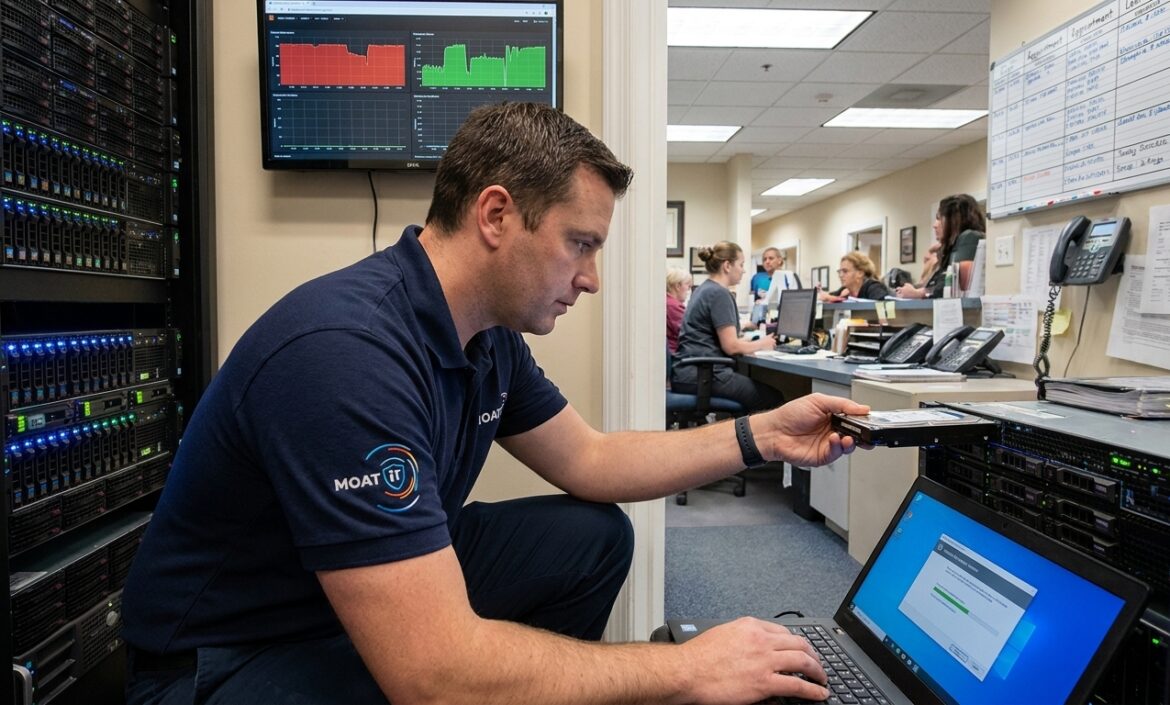
At 1:17 p.m. on a Tuesday, a 14-person medical office in southern Idaho lost access to its scheduling system. By 2:05, the front desk was back on paper. By 3:40, staff were using personal phones because email was down too. The cause? A server issue, weak backup coverage, and an IT vendor that only stepped in after something broke.
Managed IT services give growing businesses ongoing IT support, monitoring, cybersecurity, backups, and planning — all for a fixed monthly fee. The goal is straightforward: prevent more problems, recover faster, and make technology less disruptive as your business grows.
That Idaho office paid for one outage twice. First in lost productivity. Then in cleanup costs, missed appointments, and a harder question: why had the business become that exposed in the first place?
We see this pattern with law firms, dental groups, accounting offices, and multi-site companies across Idaho and the Intermountain West. The problem is rarely carelessness. It is usually growth. What works at 8 employees and one location starts to crack at 25 users, two offices, remote staff, and tighter compliance requirements.
Table of Contents
→ What Managed IT Services Actually Include
→ How Managed IT Services Work in Practice
→ The Biggest Problems Managed IT Services Solve
→ Managed IT Services vs. Break-Fix IT Support
→ What to Look for in a Managed IT Provider
→ Managed IT Services by Industry
→ Managed IT Services in Idaho and the Intermountain West
→ Why Businesses Choose MOATiT
→ FAQ: Managed IT Services

Why Reactive IT Is Costing Your Business More Than You Think
Most outages do not begin as dramatic failures. They begin as background noise.
A workstation runs slowly for two weeks. A backup alert gets dismissed because nothing looks broken. A firewall reaches end of life, but replacement gets pushed to next quarter. An employee keeps local admin rights because changing it feels inconvenient.
Then one ordinary afternoon becomes a business interruption.
That is the core problem with break-fix support: it trains businesses to live with friction until friction becomes failure. On paper, it looks cheaper because you only pay when something visibly breaks. In practice, the hidden costs of payroll lost to downtime, client delays, surprise invoices, and managers pulled into troubleshooting are often far larger.
Real-world example: A 22-person legal firm with two offices loses access to matter files before a court deadline. The copier vendor says it is the network. The ISP says the circuit is fine. The firewall provider says they do not manage endpoints. The solo IT contractor says he can stop by tomorrow. The technical problem is bad. The confusion over who owns the fix is often worse.
Security raises the stakes further. According to the
Security raises the stakes further. According to the Verizon 2024 Data Breach Investigations Report, the human element is involved in most breaches — including credential abuse and phishing incidents. The IBM Cost of a Data Breach Report 2024 puts the average global breach cost at $4.88 million. For healthcare, legal, and financial firms, a security incident also triggers compliance obligations and lasting client trust damage that goes well beyond the invoice.
What Managed IT Services Actually Include
Managed IT services are not just outsourced help desk tickets. A capable provider builds an operating model for your technology covering prevention, response, documentation, security, and strategic planning.
1. Proactive Monitoring
Servers, endpoints, cloud apps, backup jobs, and security alerts should be watched continuously before users notice symptoms. If disk health is degrading, the drive gets replaced before it fails. If patches are missing, they get scheduled, applied, and verified. If a backup job fails overnight, the provider knows before a restore is ever needed.
2. Help Desk and User Support
People need help when Outlook stops syncing, MFA locks them out, or a laptop will not connect before a client meeting. Quality support means ticket ownership, triage, escalation, documentation, and follow-through not whoever happens to answer the phone.
3. Cybersecurity Built In
Security should be part of the service model, not bolted on after an incident. For most SMBs, that means:
- Endpoint protection and email filtering
- Multi-factor authentication (MFA) enforcement
- Patch management and device controls
- Access reviews and vulnerability visibility
- Incident response process
- Security awareness training for staff
In regulated environments, the provider should also understand how these controls support audit readiness and compliance documentation. The NIST Cybersecurity Framework 2.0 is a useful reference for structured security planning.
4. Backups and Disaster Recovery
Many businesses think they are protected because they are backed up. Those are not the same thing. A sound backup strategy includes monitoring, retention policies, tested restores, recovery priorities, and clear recovery time expectations. If a server fails, leadership should already know what comes back first and how long recovery should take.
5. Cloud and Microsoft 365 Management
Microsoft 365, Teams, SharePoint, OneDrive, Entra ID, remote access, mobile device policies, and licensing all require active management. Without it, permissions sprawl, inactive accounts remain, and no one knows who owns administration. Managed IT services restore and maintain control.
6. Vendor and Infrastructure Coordination
Firewalls, switches, wireless access points, workstations, internet providers, printers, line-of-business apps, and software vendors all create dependencies. Someone has to own the complete picture. When that role is missing, every issue becomes a chain of vendor calls and finger-pointing.

How Managed IT Services Work in Practice
Assessment and Discovery
Before a provider can support an environment well, they need to understand it: users, devices, networks, cloud apps, licenses, vendor relationships, backup status, and security gaps. This is often where businesses find surprises old accounts still active, unsupported hardware, unknown subscriptions, or a backup job that has not completed successfully in weeks.
Roadmap and Planning
From the assessment, the provider builds a roadmap tied to business priorities. If you plan to open a second office, absorb an acquisition, or tighten security controls, your IT plan should reflect that. Experienced providers do not hand you a giant wish list in month one. They sequence priorities against your budget and operations.
Onboarding and Standardization
Strong providers document the environment, organize vendor contacts, inventory assets, define escalation paths, and begin standardizing systems. That work is not glamorous, but it is why support gets faster over time. Without documentation, every ticket starts from scratch.
Ongoing Rhythm
After onboarding, managed IT becomes a consistent rhythm. Tickets are handled daily. Systems monitored continuously. Patches, backups, and security controls reviewed on a schedule. Leadership gets reporting that drives decisions, not just technical noise. The useful questions are straightforward: What keeps breaking? What is aging out? Where are the security gaps? What needs budget next quarter?
The Biggest Problems Managed IT Services Solve
The clearest sign a business has outgrown ad hoc IT is not one catastrophic event. It is a recurring drag.
New hires wait too long for setup. Employees stop reporting problems because support feels slow. Leadership delays software rollouts or security upgrades because every technology project feels messy. The business still functions, but it becomes fragile.
Managed IT services reduce that fragility in several practical ways:
- Shorter issue resolution: monitoring, standardization, and a defined support process mean technicians already know your environment when an issue hits
- Closed security gaps: weak offboarding, inconsistent MFA, unmanaged endpoints, and broad permissions are identified and corrected proactively
- Relieved internal overload: office managers and operations leads stop moonlighting as IT staff
- Coordinated vendor landscape: one partner owns documentation, standards, and support workflows, so less time is lost to confusion
Managed IT Services vs. Break-Fix IT Support
Most businesses are not deciding whether they need IT support. They are deciding which support model they can trust as they grow.
| Category | Managed IT Services | Break-Fix IT Support |
|---|---|---|
| Billing model | Fixed monthly fee | Hourly or per incident |
| Support style | Proactive and ongoing | Reactive after failure |
| Monitoring | Included 24/7 | Usually limited or none |
| Cybersecurity | Built into the service stack | Added only when requested |
| Backups & patching | Managed continuously | Often inconsistent |
| Budgeting | Predictable | Unpredictable |
| Strategic planning | Regular reviews & roadmap | Rare |
| Best fit | Growing businesses needing stability | Very small, low-complexity firms |
The core flaw in break-fix is incentive alignment. In a pure break-fix model, the provider profits when systems fail. In a managed model, the provider has a financial reason to prevent recurring issues, document the environment, and standardize support.
Break-fix still fits a very small office with low complexity and limited technology dependence. Once uptime, security, compliance, remote work, or multiple locations matter, managed IT is almost always the safer long-term choice.
What to Look for in a Managed IT Services Provider
Service Levels and Response Times
Ask what the first-response target is for critical issues. Ask how priorities are defined. Ask whether after-hours support is available and what triggers onsite service instead of remote support. Vague answers here usually become frustrating realities later.
Security Depth
“We do cybersecurity” is not an answer. Ask specifically about endpoint protection, email filtering, MFA enforcement, patching, backup monitoring, vulnerability review, and security awareness. Ask how often backup restores are tested. Ask who reviews access when employees leave.
Documentation Practices
A provider should clearly explain how they maintain asset inventory, credential access, vendor contacts, network documentation, and escalation procedures. Weak documentation turns routine incidents into long, expensive ones.
Strategic Guidance
Who helps plan hardware refreshes, office expansions, Microsoft 365 governance, and risk-reduction priorities? How often do business review meetings happen? Growing businesses need more than ticket closure they need advice tied to operations, budget cycles, and timing.
Local Presence
Not every issue can be solved remotely. If a firewall fails or a new office needs setup, it helps to work with a provider that can be onsite quickly and understands your regional operating environment. This matters especially for healthcare, legal, hospitality, and multi-site businesses.

Managed IT Services by Industry
Healthcare and Dental Practices
Healthcare providers need reliable front-desk systems, secure EHR access, disciplined backups, and support that respects patient-facing workflows. A slow scheduling system, imaging issue, or check-in outage quickly becomes a patient care problem as well as a compliance risk.
Legal and Accounting Firms
These firms depend on secure document access, deadline reliability, and strong email security. Managed IT services for legal and accounting teams should cover hybrid work, permission control, document retention expectations, and the real operational cost of delayed file access.
Hospitality and Multi-Location Businesses
Multi-site operations need repeatable standards across locations. Wireless performance, POS uptime, internet redundancy, and centralized monitoring matter more when one issue can affect several locations simultaneously.
Agriculture and Field Operations
Field teams need practical support for mobility, remote connectivity, harsh environments, and staff who are not desk-based. A provider focused only on traditional office support often misses the realities of distributed, field-heavy operations.
Managed IT Services in Idaho and the Intermountain West
If your business is in Boise, Meridian, Twin Falls, Idaho Falls, or a surrounding community, local presence matters. Hardware failures, new office setups, and regional connectivity issues sometimes require hands-on support — not a remote session with someone unfamiliar with your area.
The strongest model combines regional presence with mature remote support infrastructure: local technicians for hands-on work, backed by a 24/7 service desk, security tooling, automation, and documented processes that scale as your business grows.
For many owners, responsiveness and accountability are also personal. Knowing who you are calling and that they know your environment matters in a way that a national support queue simply cannot replicate.
Why Businesses Choose MOATiT for Managed IT Services
Growing businesses do not need another vendor that only closes tickets. They need a partner that reduces friction now and helps them build an IT foundation that supports growth over the next one to three years.
MOATiT’s approach centers on proactive monitoring, standardization, security, and alignment with real business goals. In practice, that means reducing recurring issues, improving employee onboarding, tightening security controls, and giving leadership a clearer view of risk and next-step priorities.
Note for MOATiT team: This section should include specific proof points to maximize trust — response time SLAs, certifications (e.g., SOC 2, Microsoft Partner status), client retention rates, service area coverage, and 1–2 brief client testimonials or case study results. Add those before publishing.
If you are comparing providers, the better question is not “Who can fix problems when they happen?” It is: “Who will make our environment easier to run six months from now?” That is usually where the real difference appears.
FAQ: Managed IT Services
What are managed IT services?
Managed IT services are outsourced IT support and technology management delivered for a recurring monthly fee. They typically include monitoring, help desk support, cybersecurity, backups, cloud administration, device management, and planning. Unlike break-fix support, managed IT is proactive the provider works to prevent problems, not just respond to them.
How much do managed IT services cost?
Pricing depends on user count, device count, number of locations, support hours, compliance needs, and security requirements. Most providers price per user or per device, or use a blended model. Request a scoped quote based on your specific environment for accurate figures.
Are managed IT services worth it for small businesses?
For many small businesses, yes, especially once downtime, cybersecurity risk, remote work, or compliance exposure become real operational issues. Managed services often cost less than repeated outages, emergency support invoices, and lost staff productivity when compared over a full year.
What is included in a managed services agreement?
Most agreements include remote monitoring, help desk support, patching, endpoint management, backup oversight, vendor coordination, and reporting. Some also include onsite support, Microsoft 365 administration, security tooling, and strategic review meetings. Scope varies by provider and always reviews the agreement in detail.
Can a managed IT provider help with compliance requirements?
Yes. A managed IT provider can support many technical and operational controls that regulated businesses need, including access management, device standards, logging, backup controls, and documentation. They should support compliance efforts without making legal guarantees they are not qualified to own.
How do I switch from my current IT provider?
A smooth transition starts with discovery, credential transfer, documentation handoff, vendor coordination, and a structured onboarding plan. The best providers standardize your environment while maintaining support continuity throughout the handoff.
Ready to Move from Reactive IT to Managed IT Services?
That Idaho medical office eventually recovered but the expensive lesson was not about one bad afternoon. It was about trusting a support model that allowed predictable problems to build quietly until they disrupted the business.
If your systems are “mostly working,” this is the right time to look closer. Managed IT services help growing businesses reduce downtime, tighten security, improve support consistency, and plan technology with more confidence.
Request a managed IT consultation or network assessment with MOATiT. One conversation can show you where your environment is exposed, what needs attention first, and how to build an IT foundation that supports growth instead of slowing it down.


